HermesQuest: scripts
Scripts are JavaScript that Grembyte runs on the game's main thread, by hand or on a timer. They read and change the game's objects through their fields and call its methods – no addresses, no pointer chains. This page builds up from reading one value to scripts with parameters. If JavaScript is new to you, keep JavaScript in Grembyte open beside it.
To create a script: attach to HermesQuest, open the Scripts tab, click New …, give it a name, choose When it runs, and type the code. Run now runs the selected script at once; what it logs and returns appears in the log below the scripts.
The way in: GameState.Current
In a Unity game, ctx.find("ClassName") finds Unity objects – GameObjects and components. HermesQuest keeps its state in plain C# objects, which Unity does not know about. Their entry point is a static field: GameState.Current, the running game. ctx.static reads it:
"HermesQuest.GameState.Current" is namespace, class and field. The result is an object you can walk through like in C#: game.Player is the player, game.Player.Stats its stats. Because the script asks for GameState.Current every time it runs, it always finds the current game – also after "New game", where tracked addresses need a pointer chain.
1. Show the character
When: Only when run by hand.
const game = ctx.static("HermesQuest.GameState.Current");
const player = game.Player;
const stats = player.Stats;

ctx.log(`Level ${stats.Level}, turn ${game.Turn}, ${game.Kills} kills`);
ctx.log(`Health ${stats.Health.toFixed(1)} / ${stats.MaxHealth}`);
ctx.log(`Mana   ${stats.Mana.toFixed(1)} / ${stats.MaxMana}`);
ctx.log(`Gold   ${stats.Gold}, experience ${stats.Experience}`);

return player;
constgives a value a name for the rest of the script.- Text in backticks
`…`is a template:${…}inserts a value.toFixed(1)rounds a number to one decimal place for display. ctx.log(…)writes a line to the script log.return playermakes the player the script's result. The log shows it as a link: click it to open the player in the object inspector, with all its fields.
2. Heal fully – two ways
When: Only when run by hand.
Writing the fields directly:
const stats = ctx.static("HermesQuest.GameState.Current").Player.Stats;
stats.Health = stats.MaxHealth;
stats.Mana = stats.MaxMana;
Assigning to a field (stats.Health = …) writes the new value straight into the game's memory. The game does not notice that anything happened.
Calling the game's own method:
const player = ctx.static("HermesQuest.GameState.Current").Player;
const healed = player.Heal(1000);
return `Healed ${healed.toFixed(1)} health`;
player.Heal(1000) runs the game's method Character.Heal with the argument 1000. That method follows the game's rules – it never heals above the maximum – and returns how much it healed, which the script shows as its result.
Field or method?
Writing a field is direct and works for every value. Calling a method lets the game do the work with its own rules: limits, side effects, messages. When the game has a method for what you want, prefer it.
3. Regenerate on a timer
When: Repeatedly, every 5 seconds.
const game = ctx.static("HermesQuest.GameState.Current");
if (game === null || game.GameOver)
  return;

const healed = game.Player.Heal(1);
if (healed > 0)
  ctx.log(`+${healed} health`);
if (…) return;ends this run early: before the first game exists (null) or when the player is dead.||means or.game.GameOveris aboolfield of the game.- Logging only when something happened keeps the log readable – a repeating script runs hundreds of times.
The next run starts five seconds after the previous one ended, so runs never overlap.
4. Stronger player, kept after "New game"
When: Repeatedly, every 2 seconds. Parameters: two numbers, outgoing (default 2) and incoming (default 0.5).
Combat.CalculateDamage multiplies every hit by the attacker's DamageOutgoingMultiplier and the target's DamageIncomingMultiplier. Setting them on the player is the game's own way to make it stronger – but "New game" creates a new player with both back at 1. A repeating script puts them back:
const player = ctx.static("HermesQuest.GameState.Current").Player;
const wanted = { DamageOutgoingMultiplier: ctx.args.outgoing,
                 DamageIncomingMultiplier: ctx.args.incoming };

for (const [field, value] of Object.entries(wanted)) {
  if (Math.abs(player[field] - value) > 0.0001) {
    player[field] = value;
    ctx.log(`${field} set to ${value}`);
  }
}
ctx.args.outgoingis the value of the parameteroutgoing. A timed run uses the parameter's default; Run now asks for the values.{ name: value, … }is a JavaScript object;Object.entriesturns it into pairs, andfor (const [field, value] of …)walks through them.player[field]is the same asplayer.DamageOutgoingMultiplierwhenfieldholds that name: square brackets take the field's name from a variable.Math.abs(a - b) > 0.0001compares floating-point numbers. The game storesfloat, JavaScript calculates withdouble; a value like 0.3 is not exactly equal in both, so!==would report a difference every time.
The message log of the game shows the multipliers in every hit, e.g. (base 5 x2 x1).
5. Gold on demand
When: Only when run by hand. Parameter: a number amount, default 100.
const player = ctx.static("HermesQuest.GameState.Current").Player;
const amount = Math.trunc(ctx.args.amount);
player.AddGold(amount);
return `${amount} gold added, now ${player.Stats.Gold}`;
AddGold takes an int; Math.trunc cuts off decimals someone may have typed. Run it with Run now: Grembyte asks for the amount first.
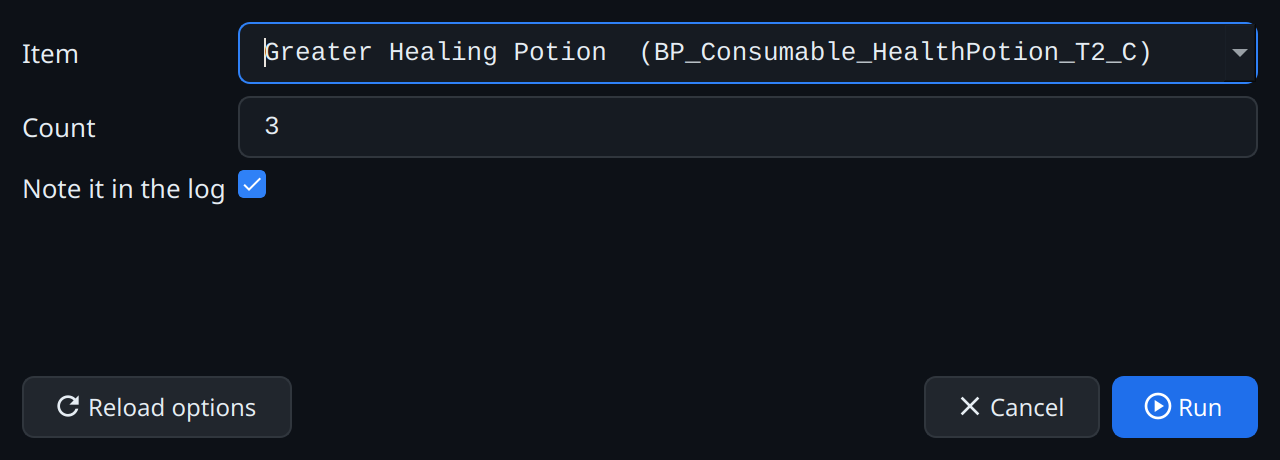
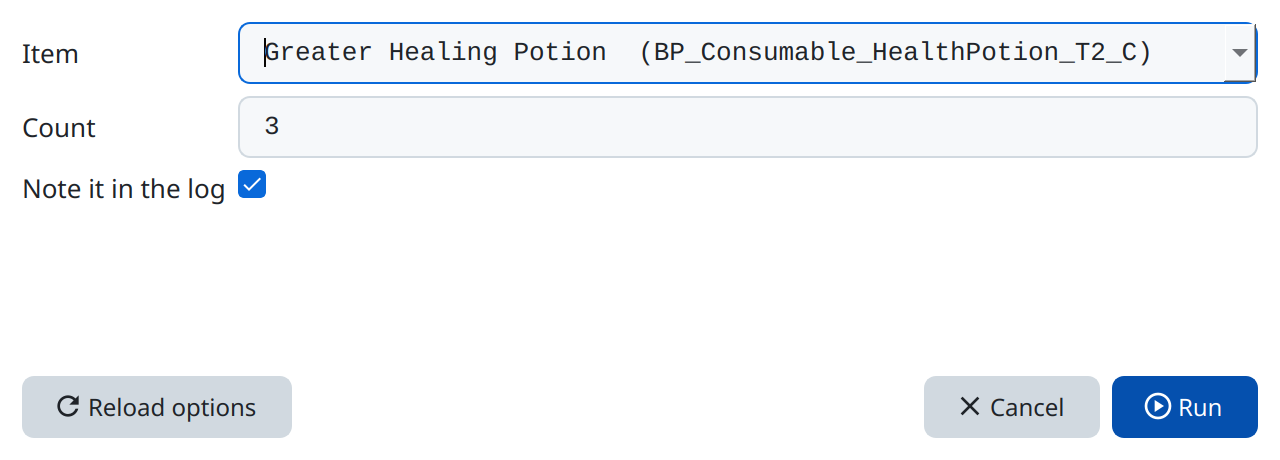
6. Train an attribute – a choice parameter
When: Only when run by hand. Parameters: a choice attribute and a number points (default 1).
The choice gets its options from a short piece of code. For attribute:
return [
  { label: "Strength (melee damage)", value: "Strength" },
  { label: "Dexterity (hit chance)", value: "Dexterity" },
  { label: "Intelligence (Fire Bolt damage)", value: "Intelligence" },
];
The list shows the labels; the script gets the value. The script:
const stats = ctx.static("HermesQuest.GameState.Current").Player.Stats;
const name = ctx.args.attribute;          // "Strength", "Dexterity" or "Intelligence"
const before = stats[name];
stats[name] = before + Math.trunc(ctx.args.points);
return `${name}: ${before} → ${stats[name]}`;
The options code runs in the game too, so it could also read them from it – for example the names of the enemies around. Here a fixed list is enough.
7. The nearest enemy
When: Only when run by hand.
const game = ctx.static("HermesQuest.GameState.Current");
const player = game.Player;
const enemy = game.NearestEnemy(player, 8);
if (enemy === null)
  return "No enemy within 8 steps";

const chance = ctx.call("HermesQuest.Combat:HitChance", player, enemy);
ctx.log(`${enemy.Name}: ${enemy.Stats.Health} health, hit chance ${Math.round(chance * 100)} %`);

enemy.Stats.Health = 1;
return enemy;
game.NearestEnemy(player, 8)calls a method of the game object and passes the player object along; the game returns aCharacterornull.ctx.call("HermesQuest.Combat:HitChance", …)calls a static method – one that belongs to a class, not to an object. The name is written as the catalog shows it:Namespace.Class:Method.enemy.Stats.Health = 1leaves the enemy at one health point; the next hit kills it.
8. Remember between runs: ctx.state
When: Repeatedly, every 10 seconds.
const gold = ctx.static("HermesQuest.GameState.Current").Player.Stats.Gold;

if (ctx.state.lastGold !== undefined && gold > ctx.state.lastGold)
  ctx.log(`+${gold - ctx.state.lastGold} gold in the last 10 seconds`);

ctx.state.lastGold = gold;
Variables declared with const exist for one run only. ctx.state is an object that the script keeps while Grembyte stays attached, also when you edit the code: whatever the script stores in it is there again on the next run. On the first run ctx.state.lastGold does not exist yet – it is undefined – which the if checks before comparing.
When something goes wrong
- An error stops the run and appears in the log with its message, e.g. for a misspelt field: HermesQuest.CharacterStats has no field Helth. The script stays and runs again at its next time.
null: before the game has created its state, or for an enemy that is gone, a field or method returnsnull. Check withif (x === null)before using it.- Names are case-sensitive:
stats.healthis notstats.Health. The object inspector (open it from a returned object) shows the exact names. - Long loops freeze the game: a script runs on the game's main thread, and the game waits until it ends. Keep scripts short and never write a loop that waits for something in the game – use a repeating script instead (its interval must be above 0).