Pointer scan
Games keep most values on the heap, so their address changes with every start, every new game and often every level. What stays the same is the way there: a static pointer in the program, then a few offsets through the objects. The pointer scan finds these chains, e.g.
reads as: take the pointer at offset 0x4040 of the module dummy_game.exe, add 0x28 and read the pointer there, add 0x0 – that is the gold.
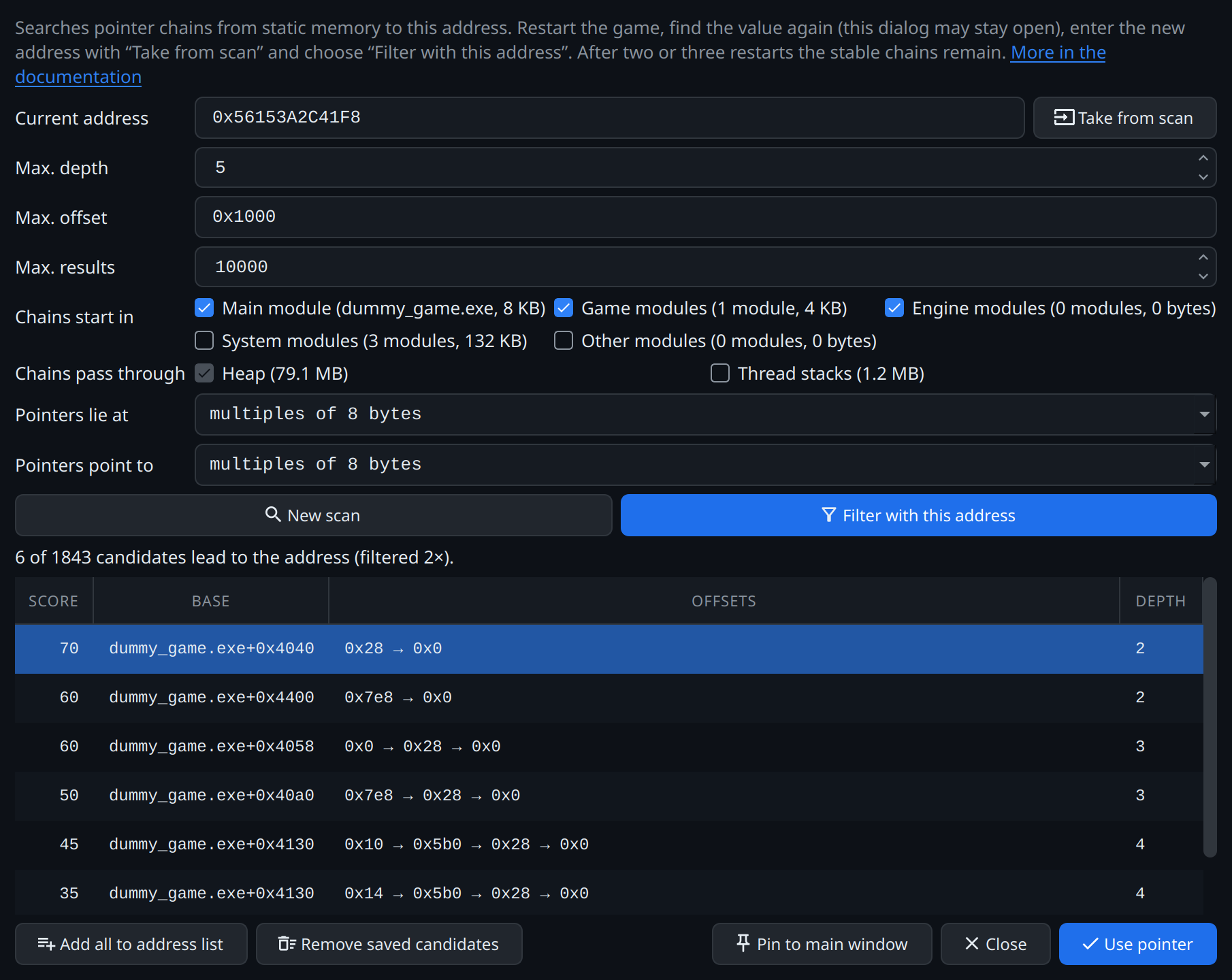
Finding a chain
- Right-click the tracked address → Find pointers … → New scan. In the test game it finds
dummy_game.exe+0x… → 0x28 → 0x0(g_game→ player → gold), plus some chance hits. - Make the value move: click New game (or restart the game) and find the value again in the scanner. The pointer dialog can stay open meanwhile; Pin to main window docks it next to the scanner, as a tab beside other docked tools, and the next pointer scan opens there too until you click Detach. It stays open when the game ends.
- Select the new result in the scanner, then Take from scan and Filter with this address in the pointer dialog. Chains that only matched because of the layout in memory drop out. A plain restart is often not enough for that, since the layout at start tends to be the same; a new game or a new level changes more.
- Select the remaining chain → Use pointer.
From now on the tracked address resolves correctly after every restart, and hooks created from it follow the value too (see hooks after a restart).
If the address lies in the program's static memory, no pointer scan is needed; the dialog says so.
Memory regions
The dialog sorts the program's writable memory into groups, each with its size; the tooltip lists the modules in it.
Chains start in the static memory of modules:
| Group | What it holds | Default |
|---|---|---|
| Main module | The program itself | on |
| Marked assemblies | Mono games: the static fields of the C# classes in the assemblies marked under Assemblies | on, once assemblies are marked |
| Game modules | Other modules in the game's folder | on |
| Engine modules | Engine runtimes and middleware: UnityPlayer, GameAssembly, Mono, Unreal's engine modules, PhysX, FMOD, Steam … | on, off once assemblies are marked |
| System modules | The system, Wine and the drivers: libc, ntdll, kernel32, Mesa … | off |
| Other modules | Everything else, e.g. Steam's overlay | off |
Chains pass through the heap, which is always searched, and the thread stacks (off by default). Stack contents change all the time; leaving them out gives fewer chance hits and a faster scan. On Linux, Wine included, a thread's stack is the memory around its stack pointer, on Windows the memory above its guard page.
Turn on system or other modules only if no chain from the game's own modules survives a restart. The choice is kept for the next scan.
Mono games: static fields as chain bases
In a Unity game with Mono, the program and its libraries hold hardly any of the game's data. The static fields of its C# classes, where singletons such as a game state keep their instance, lie on the heap: Mono gives each class a block of its own, which stays put while the game runs. Without them a chain has to find its way there through Mono's own tables, and since these point to each other in countless ways, a scan finds hundreds of thousands of candidates.
With the game's assemblies marked under Assemblies, Marked assemblies makes these blocks chain bases. The chains are few, short and readable, e.g.
Grembyte looks the blocks up through the Mono runtime at the start of the scan, and again after each restart of the game for the classes the saved chains need. Until it has, such an entry on the address list shows as not resolved. A class whose static constructor has not run yet has no block; it is looked for again every 30 seconds.
Alignment
Two settings decide what counts as a pointer:
- Pointers lie at multiples of 8 bytes in 64-bit programs, as compilers place them. Multiples of 4 also find pointers in packed structures (
#pragma pack), but the scan reads twice as many values and finds more chance hits. - Pointers point to multiples of 8 bytes by default: real pointers to objects almost always are, numbers that merely look like an address usually are not. Multiples of 16 cut chance hits further; any address finds chains through a pointer into the middle of a structure (
&object->value).
Candidates
The chains found are saved for the entry as candidates, so they can still be filtered after the game was restarted.
The table lists the most promising candidates first, by their Score; its tooltip shows how it adds up:
| Feature | Points |
|---|---|
| Starts in the main module / a game module / an engine module | +40 / +30 / +20 |
| Chain length 1 / 2 / 3 / 4 / 5 / 6 and more | +20 / +10 / 0 / −5 / −10 / −15 |
| All offsets up to 0x100 (else up to 0x400) | +10 (+5) |
| All pointers aligned: each points to the start of an object, not into its middle | +10 |
The score only sorts; whether a chain is stable shows when you filter after a restart. Add all to address list takes the best 500.
- Add all to address list adds every candidate as an entry of its own; after a restart the list shows which ones still lead to a sensible value. With several rows selected, the button reads Add selected to address list and adds only those.
- Remove saved candidates deletes them once a stable chain is in use. The entry and its pointer stay; a new scan finds candidates again.
The chain from the code instead
The code that uses a value often shows its chain, too: the code explorer writes it next to each line. The pointer chain example reads the chain of the test game's gold from add_gold and enters it with Pointer chain … on the address list – no scan needed.
Fewer, shorter chains
Prefer short chains from the game's own module over long ones through system libraries. When several chains survive filtering, keep the one with the fewest levels; repeat the filter step after a level change if in doubt.